What it is
It is feedback between colleagues, for learning. A radiologist or a referring clinician reads a report that prompts a comment and records it in about a minute. The tool makes sure each comment reaches someone who can act on it, and that the person who raised it hears what happened.
Learning opportunity
Something in a report that could have been better: a missed finding, a misinterpretation, a report that was unclear or did not answer the clinical question, a critical finding that was not passed on. It is checked and reviewed, then goes to the provider or the local department for a response.
Great call
A report worth acknowledging: it picked up an important finding, was clear and actionable, answered the clinical question, compared carefully with prior imaging or came back quickly. A great call is sent straight to the provider or the local department with the sender's name. It is never reviewed.
Who gives feedback
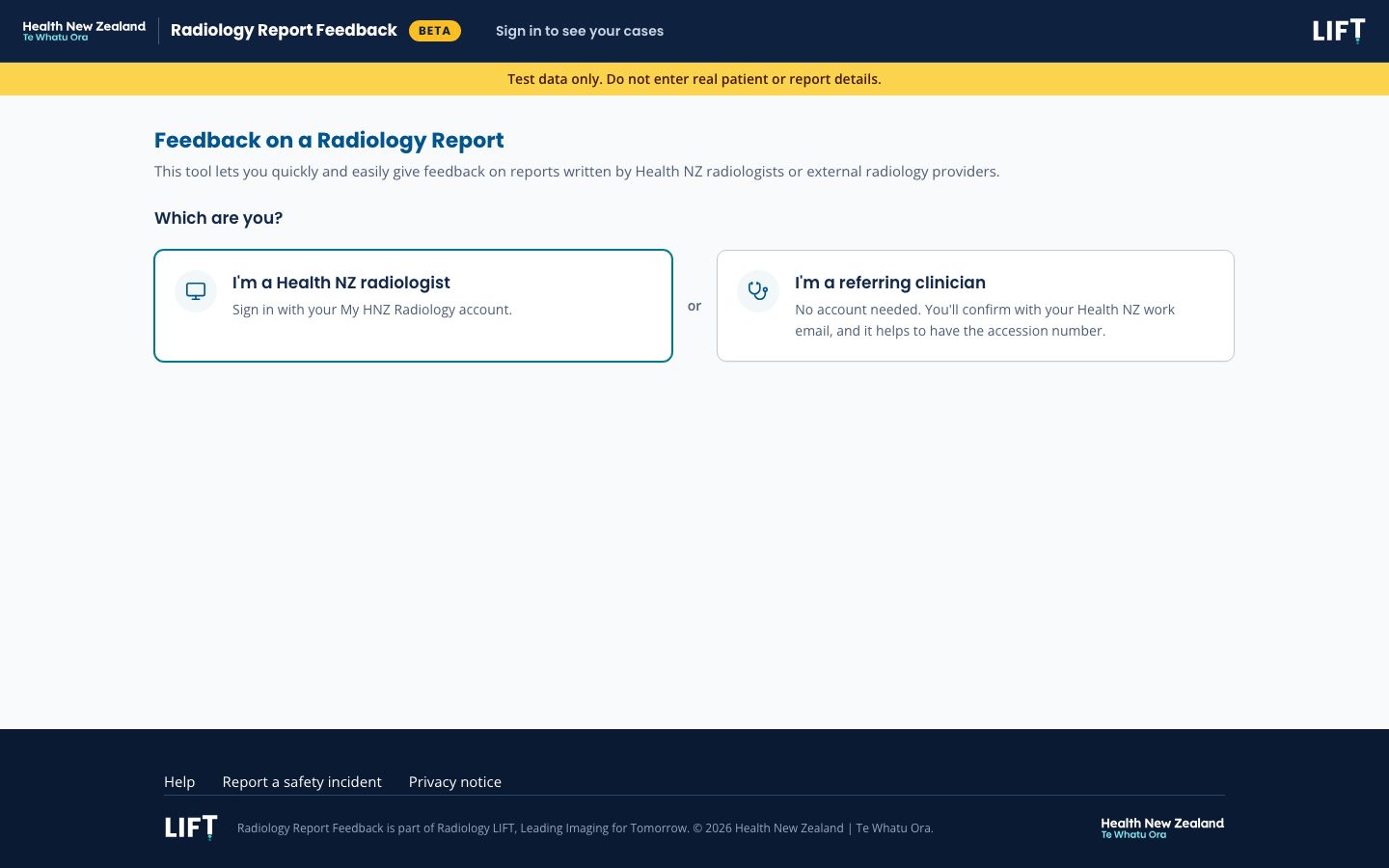
- Health NZ radiologists, signed in with their My HNZ Radiology account. A radiologist can give feedback on a report from an external provider or from Health NZ.
- Referring clinicians, from a ward or clinic. They need no account and give a Health NZ work email when they save or send.
What it does not cover
- Patient harm still goes through the local incident system. The form says so when harm is recorded and asks for the incident reference.
- It does not rank or discipline individual radiologists.
- It is not a channel for complaints about a provider.
- For a Health NZ report it adds to local feedback pathways and does not replace them.
Giving feedback
Everyone starts on the same page, "Feedback on a Radiology Report", and chooses "Flag a learning opportunity" or "Acknowledge a great call". The form then asks only what the case needs, and only once an earlier answer makes it relevant.
Paste the report
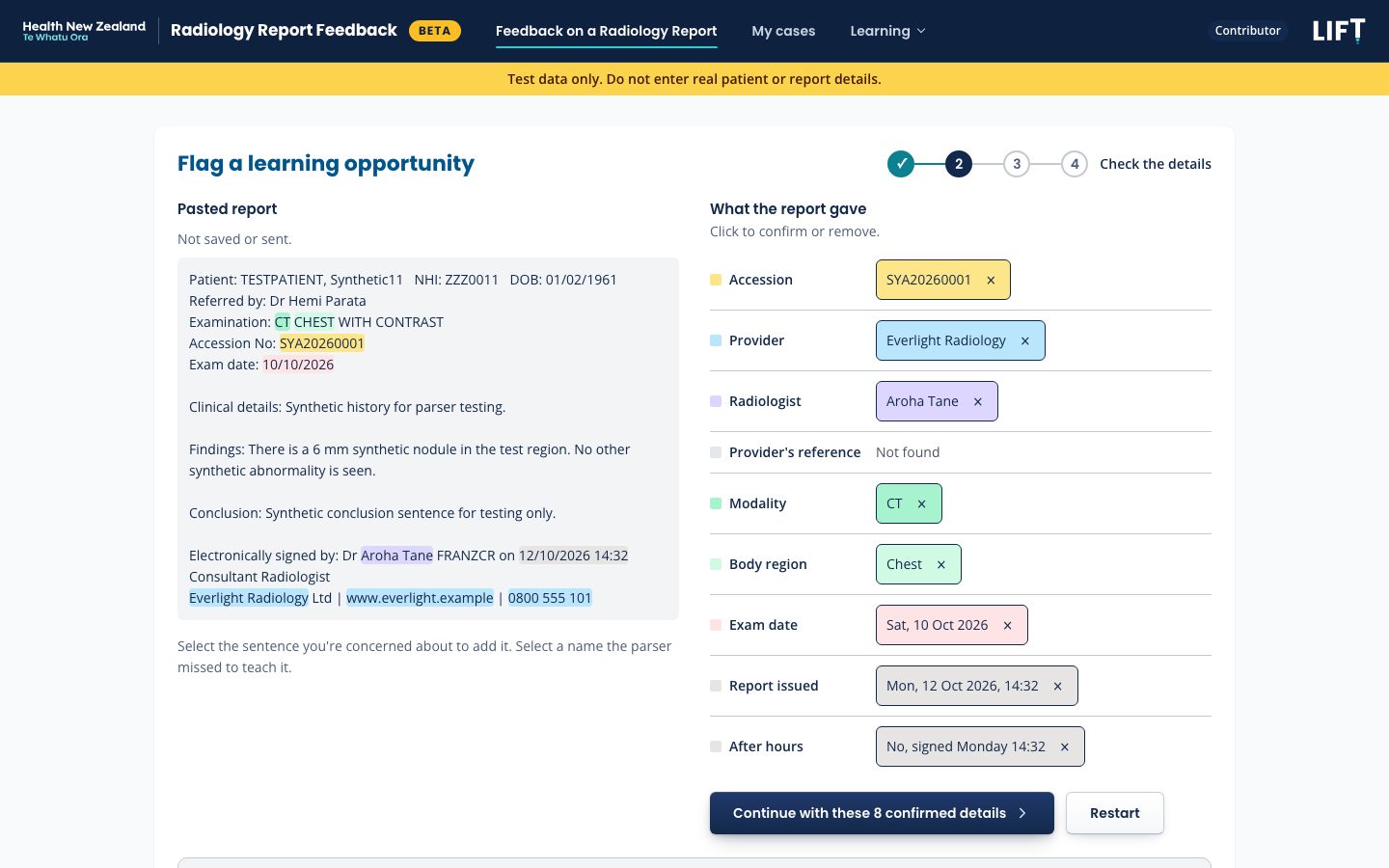
A radiologist can paste the report instead of typing the details. The browser reads it and fills in what it is sure of: accession, provider, reporting radiologist, modality, body region and dates. A value it is less sure of is offered as a button to click, and anything it cannot find is marked so. Each filled value can be removed.
The questions that follow:
- What went wrong, on a Report tab and a Service tab. More than one issue can be ticked.
- For a missed finding or a misinterpretation, how serious it was, asked in plain words. For anything else, the impact on the patient.
- The report details needed to sign: provider (searched by name, "Not sure" allowed), reporting radiologist ("Not known" allowed), modality, body region and exam date. Everything else is optional, on an Add context tab.
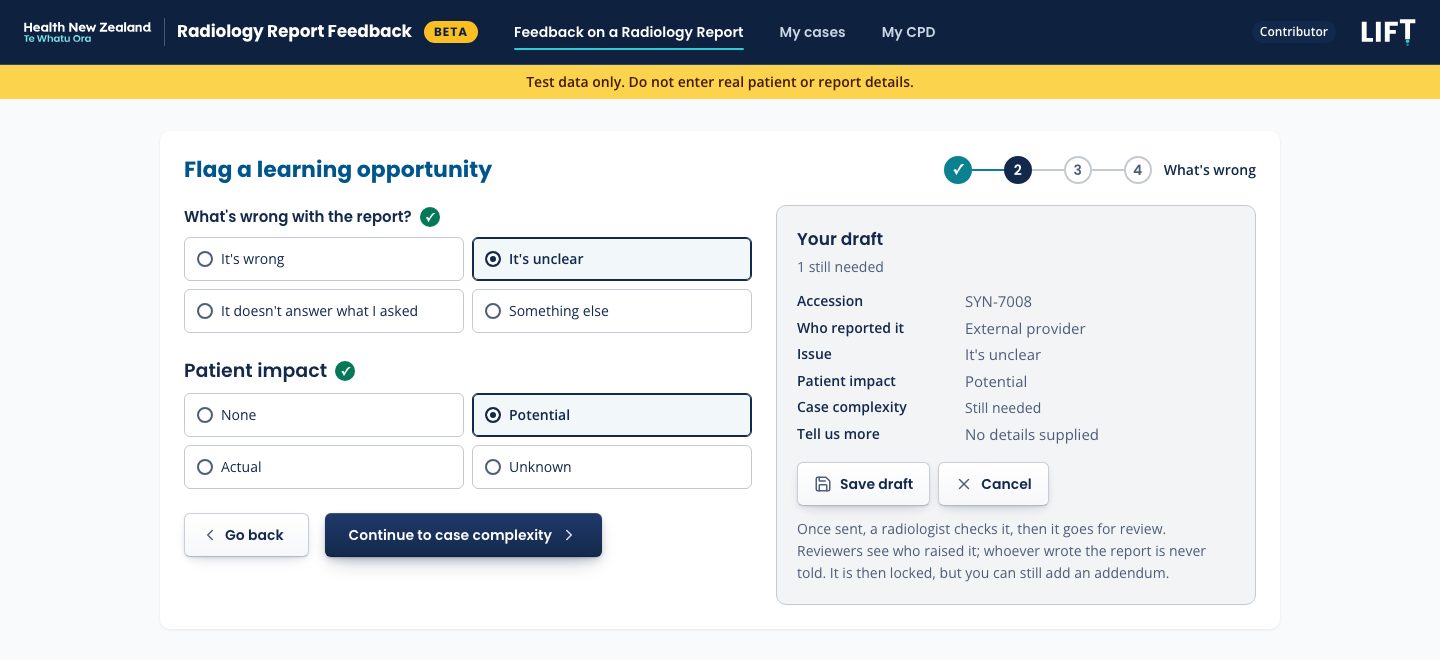
A "Your draft" panel shows the feedback as it will be sent and what is still needed. The radiologist can sign at once or save a draft, which is emailed to them as a link to finish later. If the study has already been flagged, the form shows the date it was flagged and offers to add a note to that case instead of opening a second one.
Four steps
A referring clinician's form is walked through in four steps, with Continue and Go back between them:
- The report: the accession number, and who reported it (a Health NZ radiologist, an external teleradiology provider, or not sure).
- What's wrong (it's wrong, it's unclear, it doesn't answer what I asked, or something else in their own words) and the impact on the patient.
- Case complexity: general, subspecialty or uncertain, each with guidance.
- Tell us more, in free text.
A clinician is never asked to grade severity. That judgement belongs to the radiologist who checks the case.
A great call
A great call has its own short form: the accession, who reported it, what made it great (any of the five reasons above, ticked), the provider and reporting radiologist for an external report, and an optional note. Signing closes it at once.
What happens next
Every signed learning opportunity ends with a recorded outcome, and the person who raised it is told what it was.
Checked
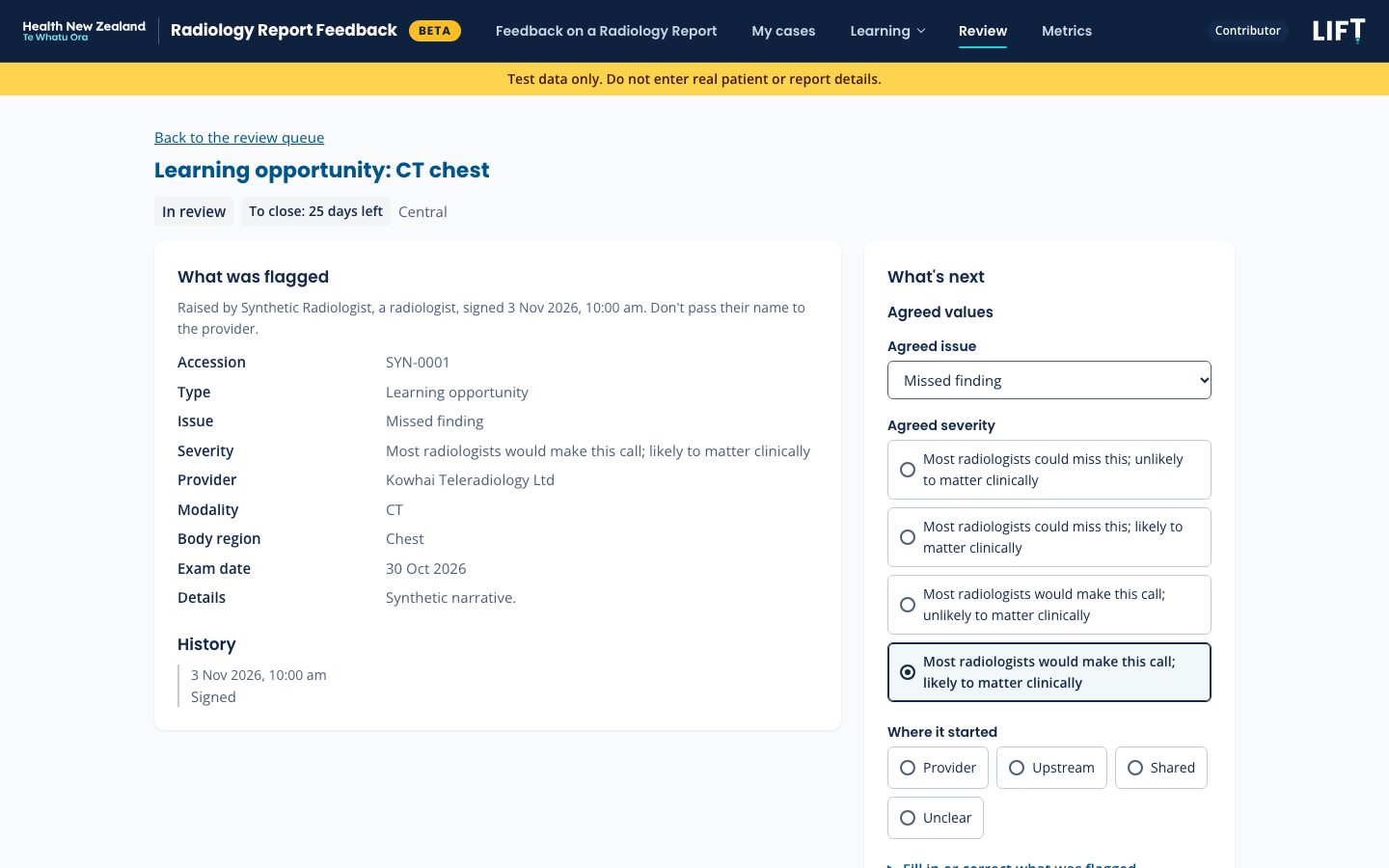
A clinician's learning opportunity is first checked by a radiologist reviewer. It either joins the review queue, or is closed with a short reason the clinician can see. A radiologist's goes straight to the queue.
Reviewed
A reviewer for the case's region takes it on. They record the agreed issue, severity and where the problem started, and fill in details the person who raised it did not know. The original answers are kept beside the reviewer's. Nobody reviews a case they raised. If the problem started before the report (missing priors, thin clinical details, the wrong protocol), the case closes there and is counted with other upstream causes.
Sent on
For an external report, the reviewer raises it with the provider through the existing outsourcing channels and marks it sent. For a Health NZ report, it goes to the region's local department contact. The provider is never told who raised it.
Answered and closed
The reviewer records the response and closes the case with an outcome. The person who raised it gets an email with the outcome and a link to the case, and a monthly summary of what happened to their cases.
Time limits
Each stage has a limit, counted in working days with New Zealand public holidays left out. A case past its limit is raised with the reviewer, then with the region's Regional Service Delivery Lead.
| Stage | Limit |
|---|---|
| A clinician's case checked | 5 working days |
| Review started | 5 working days |
| Response from the provider or department | 10 working days |
| Signed to closed | 30 calendar days |
Learning and CPD
Two things follow from a closed case: a learning point can be shared with radiologists in every region, and taking part is recorded for each person.
Learning points
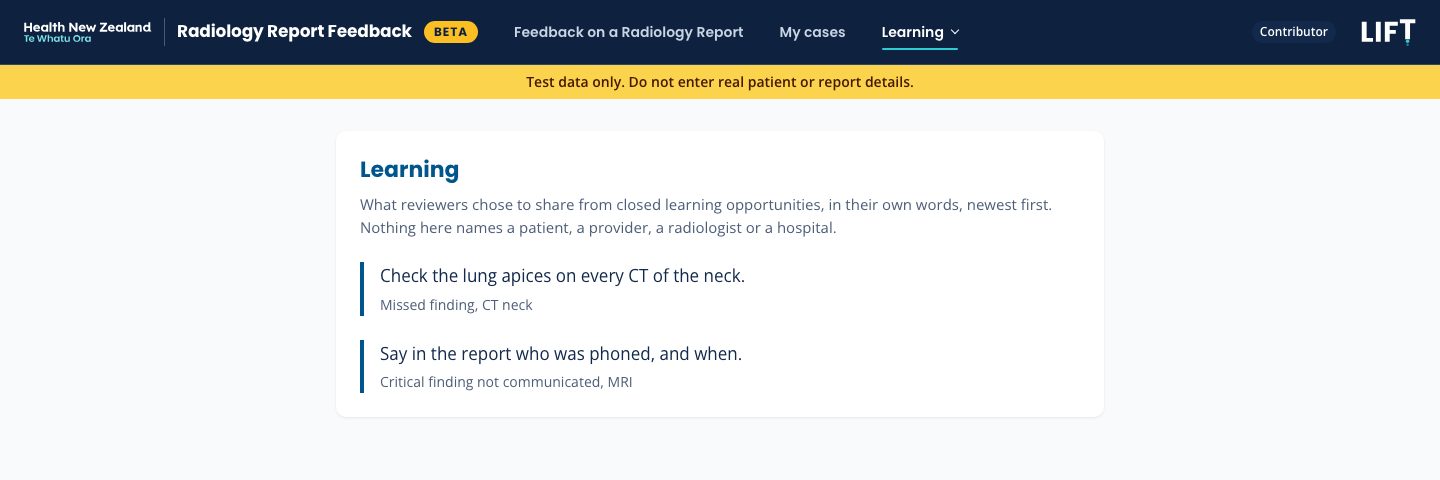
When closing a case, the reviewer can share a short learning point in their own words. Shared points appear on a Learning page for radiologists in every region, newest first, each labelled only with the issue, modality and body region. Nothing on the page names a patient, provider, radiologist or hospital. The reviewer can change or withdraw a point later. Learning points are never put in an email; the monthly summary says how many are new.
My CPD
A My CPD page shows, month by month, the learning opportunities a person flagged, the great calls they sent, and the cases they checked and reviewed, and prints a year at a time. It gives counts only and claims no hours. How the activity counts toward CPD is a question for RANZCR or the person's own college.
Metrics
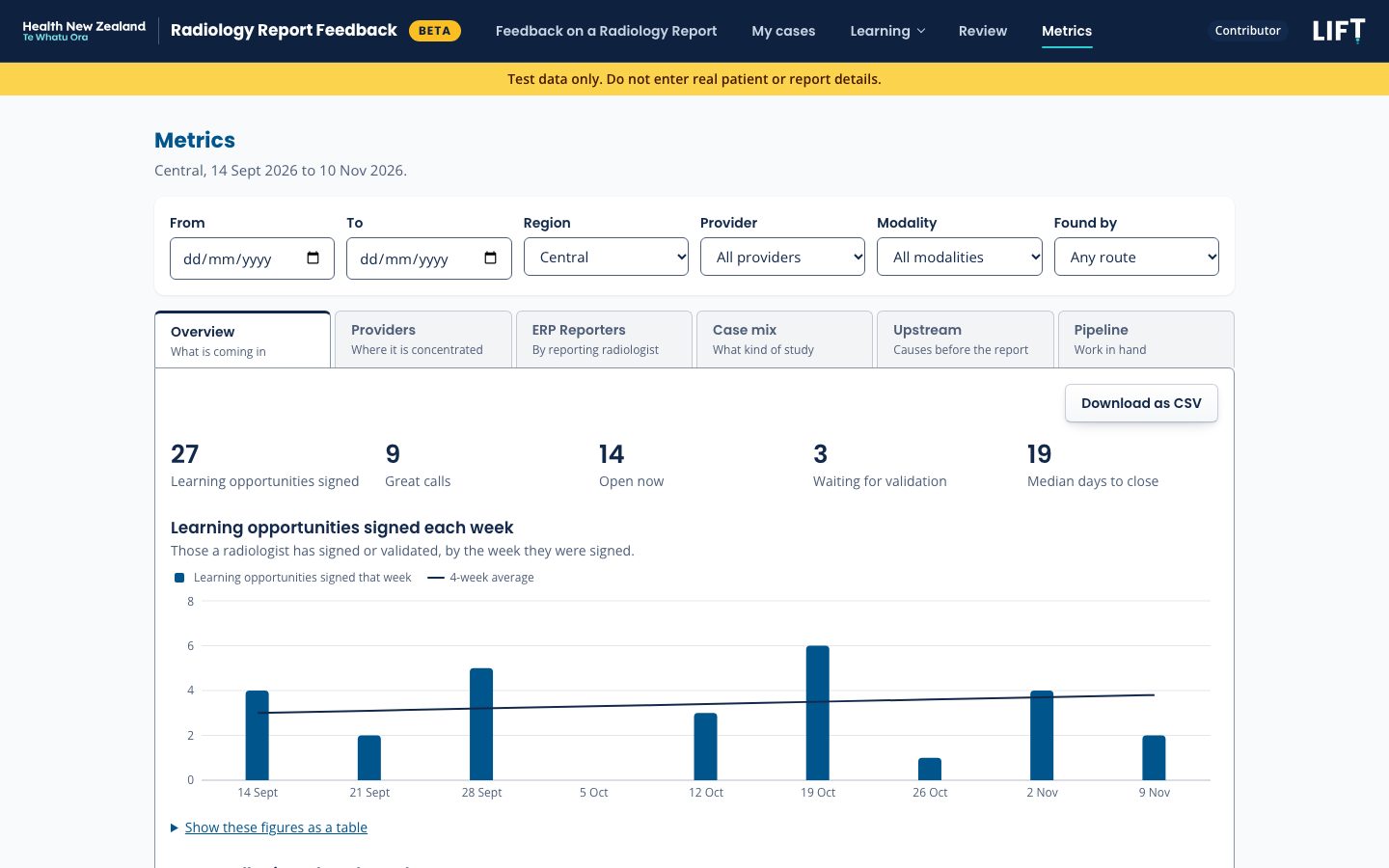
Metrics show what is coming in, where it is concentrated, and whether it is being dealt with. They count learning opportunities once a radiologist has signed or checked them, using the reviewer's agreed values where there are some, with great calls beside them.
| Tab | Shows |
|---|---|
| Overview | Learning opportunities signed each week, open cases, ageing, median days to close, great calls |
| Providers | Counts for each provider by issue, the share upheld after review, response times, and a weekly control chart |
| ERP Reporters | Counts for each reporting radiologist at a provider, in and after hours |
| Case mix | Modality, body region, patient setting, after hours |
| Upstream | Causes that started before the report, by facility |
| Pipeline | Drafts, the checking queue and overdue cases |
Who sees what
- Viewers, such as clinical directors, see Metrics for their regions and no individual case. A count of 1 or 2 shows as "<3".
- Reviewers, outsourcing managers and admins see exact counts and the control chart.
- ERP Reporters is open only to reviewers and outsourcing managers.
Reading the provider figures
The figures are counts. A provider that reads more studies will show more feedback, and the Providers tab says so. Rates per thousand studies will follow once outsourced volumes are available. Feedback sent in when something stood out is a biased sample, so great calls are shown beside learning opportunities.
Privacy
Nothing that identifies a patient goes into the tool's text, email, links or logs.
What is stored
- The accession number identifies the study. No patient name, NHI number or date of birth is asked for.
- Every free-text box is checked, in the browser and again on the server, for an NHI number, a date of birth or a title followed by a name, and refuses them.
- Fields that could identify a case are stored encrypted, and every read of them is logged.
What is sent
- Emails about learning opportunities carry labels, dates and a link, never case text.
- A great call's email includes the accession, so the provider or department can find the report.
- A pasted report never leaves the browser.
Who can do what
| Who | What they can do |
|---|---|
| Radiologist | Give feedback, finish drafts, sign, add addenda, read Learning points and My CPD |
| Referring clinician | Give feedback with no account; see their own cases after confirming their work email |
| Reviewer | Check and review cases in their regions, record the response and outcome, share learning points |
| Outsourcing manager | Keep the list of providers and ERP Reporters, read Metrics for their regions |
| Viewer | Read Metrics for their regions, with small counts hidden |
| Admin | Contacts, escalation rules and exports. Admin alone does not open cases |
Where to find it
Radiology Report Feedback is in beta testing at beta.reportfeedback.hnzradiology.nz, with synthetic data only. A banner on every page says not to enter real patient or report details. Radiologists sign in with their My HNZ Radiology account; referring clinicians need no account. Review, Metrics and admin access are set by an HNZ Rad Tools administrator.
Where it stands
Real cases wait on a privacy gate: approval to host the data, a privacy impact assessment, declaration as a protected quality assurance activity under the Health Practitioners Competence Assurance Act, custody of the encryption keys, and a security review. After that, one region runs a pilot for 8 weeks before the tool opens nationally. Logins for providers, so each can see and answer its own cases in the tool, are planned after the pilot.